

 sales@agilitz.com

Define the fulfilment problem
Distributed order management, or DOM, is an order fulfilment optimisation capability in Dynamics 365 Commerce. It evaluates eligible orders and locations against configured objectives and constraints, then produces a fulfilment plan.
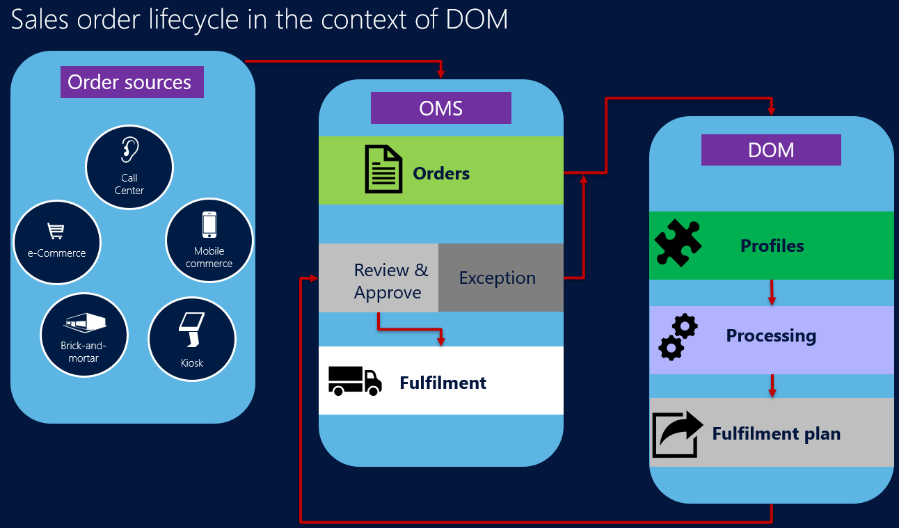
DOM operates through scheduled batch processing. It should not be presented as a guarantee that every order is routed instantly or that the system independently delivers every downstream warehouse activity.
Configure profiles and rules
A fulfilment profile determines which orders are considered and which strategy applies. Rules can constrain location eligibility, distance, split fulfilment and other business requirements. Review the inventory and cost inputs as carefully as the optimisation settings.
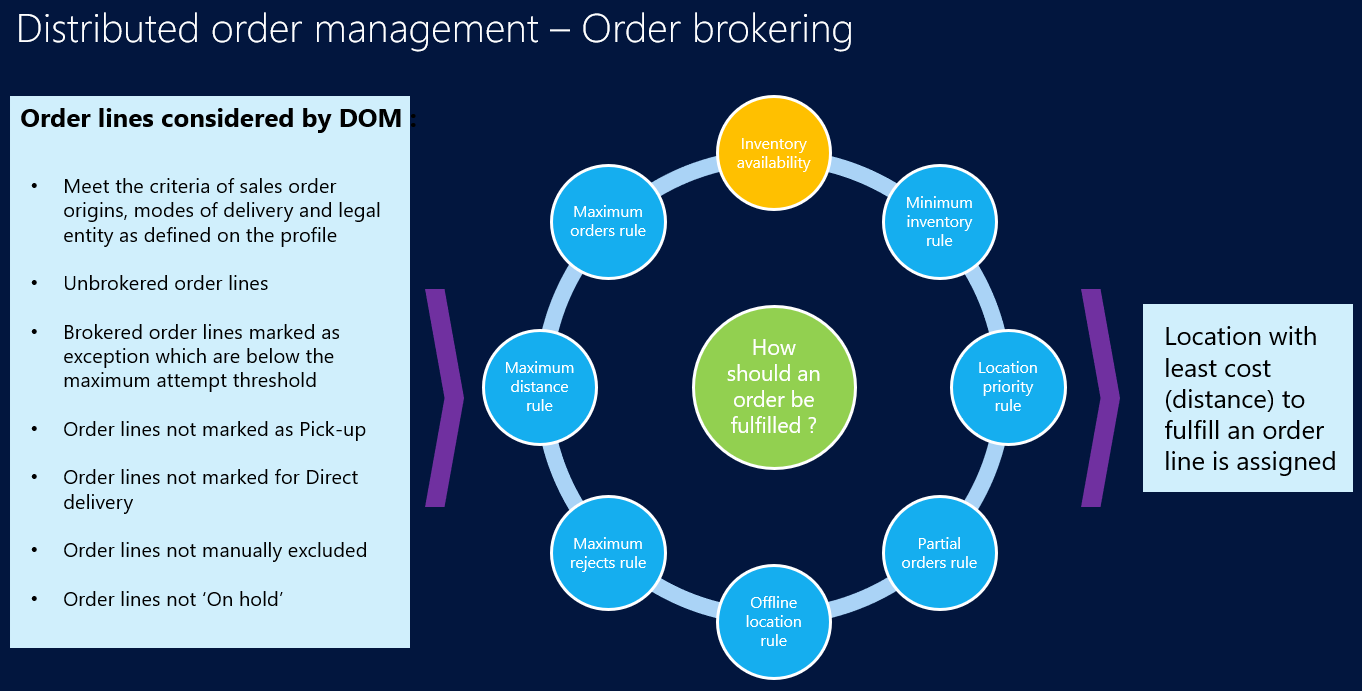
- Separate profiles where order origins or delivery modes require different strategies.
- Confirm the eligible fulfilment locations and available inventory.
- Define the cost and distance assumptions used in the decision.
- Test exceptions and orders that cannot be fulfilled within the constraints.
Understand the processing sequence
- The scheduled job selects eligible order lines.
- Orders are partitioned for optimisation according to the profile settings.
- The process evaluates inventory, candidate locations and constraints.
- A fulfilment plan is generated and applied or reviewed according to configuration.
- Operations teams monitor exceptions and continue the relevant fulfilment activities.
The production solver’s 1,500-line partition is a default when the profile’s maximum-lines setting is zero; it is not a universal fixed maximum. Choose and test partition settings against representative order volumes.
Check warehouse and mapping dependencies
DOM works with advanced warehouse management, but specific inventory dimensions and warehouse reassignment scenarios have limitations. Existing warehouse work and shipments can affect whether a line can move to a different warehouse. Review these cases before extending the process.
For mapping, review Azure Maps configuration and any existing Bing Maps dependency against Microsoft’s current retirement guidance. Do not assume a new deployment should use the same mapping service as an older demonstration.
Measure the operational result
Monitor failed runs, unassigned lines, split shipments and repeated exceptions. Compare actual fulfilment performance with the objectives used in the profile. A technically successful optimisation run is only useful if the resulting plan can be executed by stores and warehouses.
Start with a representative pilot covering stock shortages, multi-location orders and constrained delivery choices. Refine the rules with operations teams, then increase the scope once the exception process is understood.
Further reading
For current feature availability, prerequisites and detailed configuration, refer to Microsoft Learn.
Screenshots and scenarios are illustrative. Interface labels and available features can vary by application version and environment.